

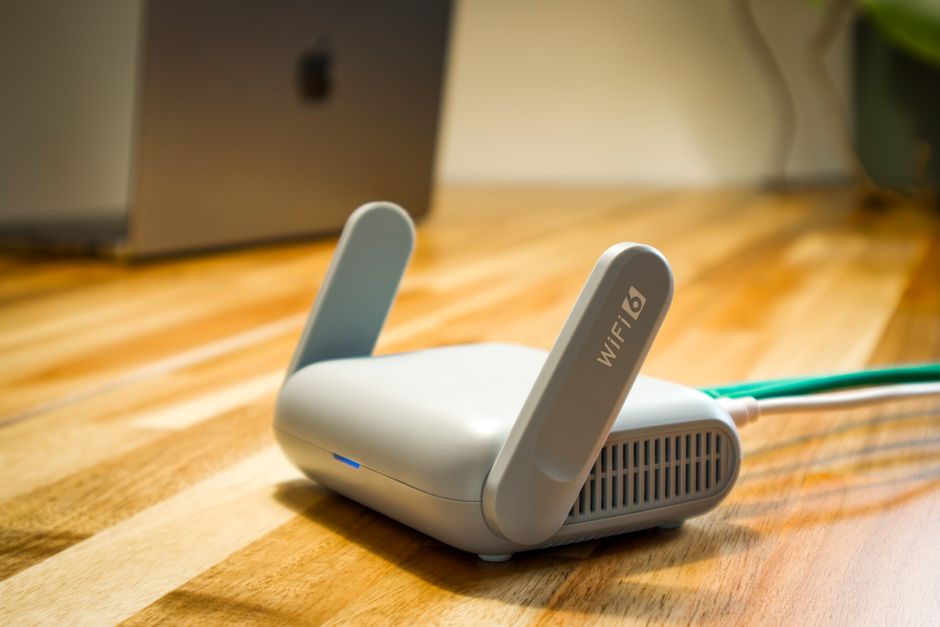
For most home users, Wi-Fi 6 offers ample speed, capacity, and efficiency for typical household activities like 4K streaming, online gaming, and supporting numerous smart home devices. Wi-Fi 7, while theoretically much faster and more advanced, is primarily beneficial for cutting-edge applications such as VR/AR, uncompressed 8K video streaming, and very data-intensive professional work, especially where multiple devices demand extreme bandwidth simultaneously. The decision between Wi-Fi 6 and Wi-Fi 7 largely depends on your current internet plan, the types of devices you own, and your willingness to invest in future-proofing for applications that are not yet mainstream in most homes.
In the digital age, a reliable and fast home network isn’t a luxury; it’s fundamental. Whether you’re a professional collaborating remotely across time zones, a student juggling online classes and streaming entertainment, or a family managing a growing fleet of smart devices, your Wi-Fi is the invisible backbone of your daily life. The constant evolution of Wi-Fi standards can be perplexing, with each new iteration promising revolutionary speeds and capabilities.
When considering an upgrade or setting up a new network, the question often arises: should I invest in the current generation, Wi-Fi 6, or hold out for the latest, Wi-Fi 7? This isn’t just about raw speed numbers; it’s about practical benefits for your specific usage, device compatibility, and the actual internet service coming into your home. Let’s explore what technology and digital tools Wi-Fi 6 vs Wi-Fi 7 truly offers for the average home user, cutting through the hype to focus on what genuinely impacts your connectivity.
Understanding the Foundation: Wi-Fi 6 (802.11ax)
Wi-Fi 6, also known as 802.11ax, has been the standard for several years now, and for good reason. It wasn’t just about faster theoretical top speeds compared to Wi-Fi 5 (802.11ac); it was a significant leap in efficiency, especially in congested network environments. Think of it less like a wider highway and more like a smarter traffic management system. Its key innovations are OFDMA (Orthogonal Frequency Division Multiple Access) and MU-MIMO (Multi-User, Multiple-Input, Multiple-Output).
- OFDMA: This allows a router to serve multiple devices simultaneously on a single channel, dividing the channel into smaller resource units. It’s like a delivery truck making several stops on one trip instead of a separate trip for each package. This is a practical advantage for homes with many smart devices, laptops, and phones all vying for bandwidth.
- MU-MIMO (Enhanced): While present in Wi-Fi 5, Wi-Fi 6 significantly improved MU-MIMO to allow more devices (up to 8, theoretically) to communicate with the router at once, both upstream and downstream. This reduces lag and improves overall network responsiveness, crucial for remote work video calls or online gaming.
- Target Wake Time (TWT): A less heralded but important feature, TWT improves battery life for connected devices, particularly smart home gadgets, by allowing them to schedule when they wake up to send or receive data. This means your smart thermostat or security camera isn’t constantly draining power searching for a signal.
- WPA3 Security: Wi-Fi 6 routers often implement WPA3, the latest Wi-Fi Protected Access protocol, offering more solid encryption and better protection against brute-force attacks. This is vital for maintaining privacy and cybersecurity in an increasingly connected world.
For most households in the US, UK, Germany, or France, Wi-Fi 6 provides more than enough bandwidth to handle gigabit internet connections, multiple 4K streams, cloud gaming, and a growing ecosystem of smart home devices. It’s a mature and widely adopted standard.

Image Caption: A modern home office setup with a Wi-Fi 6 router visible, connecting multiple devices like a laptop, tablet, and smart speaker.
Introducing the Next Generation: Wi-Fi 7 (802.11be – Extremely High Throughput)
Wi-Fi 7, also known as 802.11be or Extremely High Throughput (EHT), is the latest and greatest, pushing the boundaries of wireless communication even further. While still relatively new to the market, especially in regions like Italy, Spain, and Poland, it brings significant enhancements designed for future-proof applications that demand unprecedented speeds and ultra-low latency.
The core advancements in Wi-Fi 7 revolve around three main pillars:
Best Privacy Settings to Change on Your Phone Today
- Wider Channels (320 MHz): Wi-Fi 7 doubles the maximum channel width from Wi-Fi 6’s 160 MHz to a colossal 320 MHz in the 6 GHz band. This is like turning a two-lane road into an eight-lane superhighway, allowing for massive data throughput.
- 4096-QAM (Quadrature Amplitude Modulation): This advanced modulation scheme packs even more data into each signal, effectively increasing data rates by 20% compared to Wi-Fi 6’s 1024-QAM. It’s like using a more efficient compression algorithm for every data packet.
- Multi-Link Operation (MLO): This is arguably Wi-Fi 7’s most innovative feature for end-users. MLO allows devices to simultaneously send and receive data across different frequency bands (2.4 GHz, 5 GHz, and 6 GHz). Imagine a truck using multiple roads at once to reach its destination faster and with greater reliability. If one band gets congested, the data can flow smoothly over another. This feature significantly enhances speed, reduces latency, and improves reliability, especially for latency-sensitive applications like VR/AR.
These enhancements position Wi-Fi 7 to tackle the most demanding future applications, from tether-free virtual reality headsets requiring multi-gigabit speeds and near-zero latency to uncompressed 8K video streaming and real-time AI productivity tools that process vast datasets locally.
Practical Benefits for the Home User: Decoding Your Needs
When evaluating technology and digital tools Wi-Fi 6 vs Wi-Fi 7, consider your current usage and future aspirations. Not everyone needs the bleeding edge.
1. Internet Service Provider (ISP) Speed
The first practical consideration is your internet subscription. If you’re on a 500 Mbps or 1 Gigabit per second (Gbps) plan, a Wi-Fi 6 router is perfectly capable of delivering those speeds wirelessly to compatible devices. Wi-Fi 7’s multi-gigabit capabilities (up to theoretical 46 Gbps) are largely academic if your ISP only provides 1-2 Gbps. Until ISPs widely offer 5 Gbps or 10 Gbps residential plans, much of Wi-Fi 7’s raw speed potential will go unused.
2. Number of Connected Devices and Network Congestion
If your home is brimming with smart devices—smart bulbs, thermostats, security cameras, smart speakers—alongside multiple laptops, phones, and tablets, Wi-Fi 6’s efficiency features (OFDMA, improved MU-MIMO) are incredibly beneficial. They ensure that even with dozens of devices, your network remains responsive. Wi-Fi 7 takes this a step further with MLO, which is fantastic for extremely dense environments or scenarios where absolute reliability is paramount.
3. Latency-Sensitive Applications
Are you a serious online gamer? Do you use VR/AR for entertainment or professional design? Wi-Fi 7’s MLO and ultra-low latency capabilities are designed for these exact scenarios. The ability to bond multiple bands drastically reduces lag and packet loss, which can be the difference between victory and defeat in an online match, or a smooth VR experience versus motion sickness. For typical 4K streaming and video calls, Wi-Fi 6 is generally sufficient.
4. Device Compatibility (Clients)
This is a critical, often overlooked point. A Wi-Fi 7 router is only as good as the devices connecting to it. If your laptop, phone, or smart TV only supports Wi-Fi 6, it will connect using Wi-Fi 6 protocols, not Wi-Fi 7. Currently, only a handful of flagship smartphones, high-end laptops, and very specific devices (like Meta Quest 3 for some markets) are Wi-Fi 7 compatible. Upgrading to a Wi-Fi 7 router might be premature if you don’t have compatible client devices to fully utilize its features.
5. Future-Proofing for Emerging Technologies
If you’re an early adopter, or if you anticipate diving into advanced AI tools, uncompressed 8K video editing, or next-gen VR/AR in the next 3-5 years, investing in Wi-Fi 7 could be a wise long-term move. Its capacity and low-latency design are geared for these future use cases. For example, local AI tools that require rapid data transfer between a powerful PC and a local server might see benefits.
6. Cost Considerations
As with any new technology, Wi-Fi 7 routers are significantly more expensive than their Wi-Fi 6 counterparts. If your budget is a concern, a high-quality Wi-Fi 6 or Wi-Fi 6E (which adds the 6 GHz band, similar to Wi-Fi 7 but without MLO) system will provide excellent performance for most everyday needs at a more accessible price point. The cost difference can often be substantial enough to influence the purchasing decision for families and students.
Pixpa Website Builder: The Ultimate Platform for Creatives, Portfolios, and Online Business Growth
Wi-Fi 6 vs Wi-Fi 7: A Quick Comparison
This table offers a snapshot for home users in the US, UK, Germany, and beyond, simplifying the key differences.
| Feature | Wi-Fi 6 (802.11ax) | Wi-Fi 7 (802.11be) | Home User Relevance |
|---|---|---|---|
| Max Theoretical Speed | Up to 9.6 Gbps | Up to 46 Gbps | Wi-Fi 6 sufficient for most ISP speeds (1-2 Gbps). Wi-Fi 7 offers overkill for now. |
| Channel Width | Up to 160 MHz | Up to 320 MHz | Wider channels for higher data throughput. Wi-Fi 7 is better for extreme data tasks. |
| Frequency Bands | 2.4 GHz, 5 GHz, (6 GHz in Wi-Fi 6E) | 2.4 GHz, 5 GHz, 6 GHz | Both use 6 GHz for less interference (if 6E/7). Wi-Fi 7 optimizes usage. |
| Modulation | 1024-QAM | 4096-QAM | Wi-Fi 7 packs more data per signal, leading to higher speeds. |
| Key Innovation for Efficiency | OFDMA, improved MU-MIMO | MLO (Multi-Link Operation) | Wi-Fi 6 excels in congested networks. Wi-Fi 7 offers superior latency and reliability. |
| Client Device Availability | Widespread (phones, laptops, smart TVs) | Limited (flagship phones, high-end laptops, few VR devices) | Crucial factor. Wi-Fi 7 requires compatible devices to leverage its features. |
| Typical Cost | Mid-range to High | Premium to Very High | Significant cost difference, consider budget and actual need. |
Image Caption: A split image showing two routers, one representing Wi-Fi 6 and the other Wi-Fi 7, with indicators for speed and coverage illustrating their differences.
Common Mistakes to Avoid When Upgrading Wi-Fi
Upgrading your home Wi-Fi should be a strategic decision, not just an impulse buy. Many users, from students to small teams, make similar errors that limit the actual benefit of a new router.
A common mistake is buying a high-end router without addressing fundamental network issues. If your internet service provider (ISP) connection is slow, or your home has significant dead zones due to construction materials (like thick concrete walls prevalent in older European buildings or multi-story homes in the US), a new Wi-Fi 7 router won’t magically solve these. Focus on ensuring your incoming internet speed meets your needs and consider mesh Wi-Fi systems for broader coverage before chasing raw speed numbers.
Another pitfall is neglecting client device compatibility. As mentioned, a Wi-Fi 7 router requires Wi-Fi 7 enabled devices to use its full potential. Purchasing a top-tier router when all your current devices are Wi-Fi 5 or Wi-Fi 6 means you’re not utilizing the new standard, effectively paying for features you can’t use yet. Always check the specifications of your most-used devices before upgrading.
Overlooking network security and privacy settings is also critical. Regardless of whether you choose Wi-Fi 6 or Wi-Fi 7, ensure you’re using WPA3 encryption where available, creating strong, unique passwords, and regularly updating your router’s firmware. With the increasing sophistication of cyber threats, especially for remote work setups, maintaining solid cybersecurity is non-negotiable. Don’t rely on default settings. These basic steps are vital technology and digital tools for safeguarding your home network and personal data.
Finally, avoid the ‘set it and forget it’ mentality. Routers, like any other piece of technology, benefit from occasional restarts and firmware updates. These updates often include performance enhancements and critical security patches. Regular maintenance, though simple, ensures your network operates optimally and remains secure against new vulnerabilities, helping you maintain peace of mind, especially when handling sensitive data for AI productivity or personal privacy.
FAQ: Answering Your Wi-Fi Questions Directly
- What technology tools solve common everyday problems related to Wi-Fi?
- Mesh Wi-Fi systems resolve dead zones and inconsistent coverage in large homes, ensuring stable connectivity for remote work and smart home devices. Wi-Fi 6 routers improve network efficiency for multiple devices, preventing slowdowns when streaming or gaming. Strong encryption (WPA3) enhances privacy and cybersecurity, protecting sensitive data. Regular firmware updates also resolve performance issues and security vulnerabilities, ensuring a smooth and safe online experience.
- Is Wi-Fi 7 truly necessary for gaming or 4K streaming?
- For most 4K streaming and casual to serious online gaming, Wi-Fi 6 offers ample bandwidth and low enough latency. Wi-Fi 7’s extreme speeds and Multi-Link Operation (MLO) are primarily beneficial for competitive esports, cloud gaming at very high refresh rates, or demanding VR/AR applications where even marginal latency improvements are critical. For typical home entertainment, Wi-Fi 6 is more than sufficient.
- Does Wi-Fi 7 improve my smart home device performance?
- While Wi-Fi 7 offers higher theoretical capacity, most smart home devices (lights, thermostats, sensors) have very low bandwidth requirements and will perform perfectly well on Wi-Fi 6 or even older standards. Wi-Fi 6’s OFDMA and Target Wake Time (TWT) are already excellent for managing numerous low-power devices. Wi-Fi 7 might offer marginal improvements in extremely dense smart home environments, but it’s not a primary driver for upgrading.
- How important is the 6 GHz band for home users?
- The 6 GHz band, available in Wi-Fi 6E and Wi-Fi 7, is crucial for reducing congestion and interference. It offers significantly more channels than the 2.4 GHz and 5 GHz bands, leading to faster, more reliable connections, especially in dense urban areas like London, Berlin, or New York, where neighboring Wi-Fi networks can cause interference. However, its range is shorter than 2.4 GHz, so it’s best for devices closer to the router.
- Should I wait for Wi-Fi 8?
- New Wi-Fi standards typically emerge every 4-5 years. While research into Wi-Fi 8 (802.11bn) is underway, it’s many years away from commercial availability and mainstream adoption. Focusing on current needs and the immediate next standard (Wi-Fi 7) is a more practical approach. Waiting indefinitely for the ‘next big thing’ often means missing out on current benefits and delaying necessary upgrades.
Final Thoughts: Making an Informed Decision
Ultimately, the choice between Wi-Fi 6 and Wi-Fi 7 for your home boils down to a pragmatic assessment of your current needs, your budget, and your appetite for future-proofing. For the vast majority of home users in the US, UK, Germany, France, Italy, Spain, and Poland, a well-implemented Wi-Fi 6 network (especially Wi-Fi 6E if you have compatible devices and a need for the 6 GHz band) provides solid, fast, and efficient connectivity for all their current digital demands, from remote work and online learning to 4K streaming and smart home management. Wi-Fi 7, with its bleeding-edge capabilities, is an excellent choice for early adopters and those with specific, highly demanding use cases like advanced VR/AR or extensive local AI data processing, provided they have the compatible client devices and internet speeds to match. Whichever you choose, prioritize network security, proper placement, and regular maintenance to get the most out of your home Wi-Fi. Explore more technology guides and practical advice on GoTrendlin to stay informed on digital trends.